
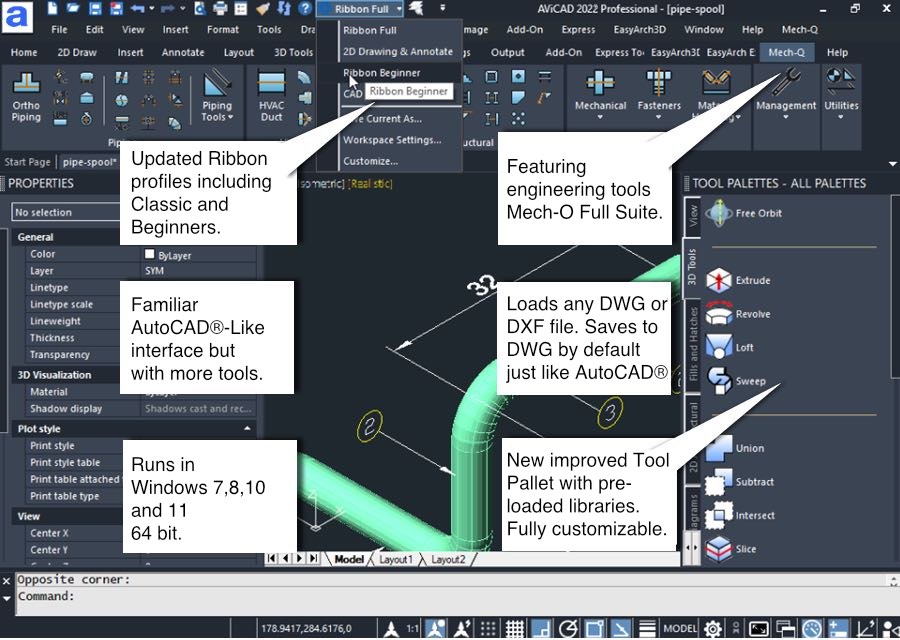
Screenshot of the AViCAD with some of main features
The new, improved user interface with support of the AutoCAD® like paper style background. Features a new look and “feel comfortable” experience.
AViCAD’s Main Features:
- Compatible with all AutoCAD® DWG’s – also supports earlier DWG versions.
- Windows 7 & 8/ 8.1/10/11 32&64 bit
- True 64-bit functionality
- Super quick installation (5-10 minutes)
- Simple registration process
- Mech-Q Engineering modules updated (always included in AViCAD)
- Choose between AutoCAD-Like Ribbon and Classic interface
- Free bonus utilities (express tools)
- Annotative Objects support
- Improved annotative scaling
- Dynamic Blocks Editing
- Stretch and pull 3D solids
- Built-in Cloud Backup (DropBox, Google Drive, Microsoft One)
- Exports to DXF, DWF, 3DS, DAE, STL, LWO, POV, BMP, WMF, EMF and SVG
- Export to any previous AutoCAD versions, both in DWG and DXF file formats
- Tool Palettes
- Faster load and save times plus XREF performance improvements
- Updated Ribbon commands
- Improved user interface
- 20,000+ Block Library *
- 2D/3D Windows, Walls & Doors *
- Advanced publishing / Export 3D PDF *
- STEP/ IGES and Solidworks import and export (available in Plus Version) *
- PDF to DWG converts vectored PDFs in one click (available in Plus Version) *
* Available in AViCAD Plus
AViCAD 2024 also has these added features:
- New CAD Engine
- Enhanced Graphics
- New Commands
- Improved Performance
- View Cube Added
- Data Linking (Excel)
- XLSIMPORT
- Blocks preview in tables
- Save multiple Blocks
- Improved in-place blocks (nested entities)
- New variable CENTERSNAPMAXVERTEX
- BREAKATPOINT (Splits 2D entities)
- Autodesk® Revit® 2022 support
- CENTERMARK and CENTERLINE
- 3DPOSITIONER (visual aid to rotate/move)
- STEP/IGES Import (better control)
- Improved Undo (copy operations)
- New CTRL+R (Switches viewports modelsp.)
- 3DWALK
- 3DWALKFLYSETTINGS
- 3DFLY
- UCS command (improved)
- SURFEXTRACTCURVE
- AIDIMSTYLE (create dimstyle from existing)
- LAYMRG – Merge Layers
- Preview Sheet dims before Plot
- Improved Explode (Blocks)
- WHOHAS (drawing user and usage)
- Improved APPLOAD command
- Improved OFFSET command (layer / erase)
- Improved QDIM command
- REGENVISIBLE (only visible area)
- Improved TOOLPALETTE
- Command Line Font
- Improved Big Font substitution
- New command -TABLE (no dialog)
- Network license Groups
- Restore suppressed messages
- MAPIMPORT (Geo Data)
- MAPIINSERT
- Improved Geolocation function
- GEOMAPSERVICE command
- Two-point break (break a dimension)
- Cones and cylinders (better height control)
- GRIP improvements for clipped blocks
- REVERSE (Reverses the vertices)
- And more …
Mech-Q engineering tools are also included at no extra cost. Get it now.
New Features
Click to see new product features
Mech-Q Full Suite (included with all AViCAD versions)
Mech-Q is a series of 4 main modules that integrate directly inside AViCAD. Mech-Q allows to:
- Draw fittings and parts parametrically with a zero learning curve
- Manage your layers and colors
- Works in either Imperial (U.S.) or Metric
- Create piping in single-line, double-line, and isometric
- Insert P&ID and plumbing symbols
- Create structural drawings with a beam designer
- Create steel stairs, railings and more
- Create rectangular & round Ducting
- Create BOM (Bill of Materials)
- Insert mechanical parts, nuts and bolts, plus more
AViCAD General Features:
AutoCAD®-Like Interface
Commands menus and icons just like AutoCAD®
Properties Palette
Easily change drawing settings on the fly
Xref Manager
A comfortable interface for the management of external references
Bitmap Clipping
Clip and polygonal clip-on images
Gradient Hatch support
Display and creation of Gradients
Polygonal layout Viewports
Display and creation
PDF Export
PDF export with layers support (DWG can be exported into layered PDF)
Find and Replace
Find and replace text and block attributes in DWG
Express Tool
A complete set of Extra functions for Blocks, Layers, Texts
Standard GUI
Comfortable, easy to use, standard graphic interface, Toolbars “AutoCAD®® like” feeling
Aerial View
In a large drawing, you can pan and zoom quickly in a window that can display the whole drawing
eTransmit
compacting and transmitting DWG file by email
Advanced CTB
Greyscale print and Screening
Rendering
Advanced rendering module with multiple lights management and the creation/editing of materials. Reflection, mirror, transparency, smooth shadows, customizable size bitmap output
Eattedit
Advanced Attribute editing
AViCAD Wblock Manager
Tool for the improved creation of blocks on disk
Solprof
2D profile image extraction from ACIS solids
AViCAD QDIM
Quick dimensioning
Google Earth™ Integration
Export your models to Google Earth
Spell Checker
Highlight and correct misspellings
AViCAD Wizard
Initial configuration mask of new designs based on prototypes or predefined values
AViCAD DWG Explorer
Windows Explorer-style windows for DWG browsing and block insertion
Snap ‘From’
The smart tool completes the Snap family
Extended Hatches
More than 300 new Hatch patterns are available
Layer Manager
Save and Restore Layers configurations
Layout
Management of multiple layouts allows the creation of all print tables of the same design and offers greater compatibility with AutoCAD®
True color support
Over the limit of 256 colors in DWG
Render Export
Export tool for LightWave (.lwo), 3D Studio (.3ds), Pov-Ray (.pov)
ECW and Jpeg 2000 raster format
The standard wavelet compression format optimized for aerial and satellite imagery
Highlighted selection area
Crossing Selection and Window Selection
Hidden lines in Dview
Hidden lines in perspective views
Layers interface
“AutoCAD® like” layers management with Layers Filters support
Quick Group
Creates Entities groups with one click
Iconografics Interactive Purge
GUI interface for Purge command
Layout Advanced Features
Hide on Layout
Shade on Layout
Selection of Model Space with Double-Click
Layout Tabs
Print area visualization
Shows the page layout
Advanced-Data Extraction
Easy to use wizard for Attributes and Blocks data export
DIESEL language support
Support AutoCAD® DIESEL programming language,
DWF Import & Export
AViCAD Professional reads and writes standard DWF 2D/3D files
3D models o2c export
AViCAD Professional contains o2c features; 3D Models are easily exported and managed with the o2c tool. o2c is the best Tool for 3D model presentations.
A 3D model is more alive, convincing and touchable
The o2c format is not only a 3D viewing on the internet but also in Microsoft PowerPoint, Microsoft Word, Microsoft Excel, and Microsoft Outlook within HTML email.
JPG and PDF print
Export drawings to JPG and PDF formats
RealTime Pan & Zoom
AViCAD Professional allows users to work with their drawings using RealTime Pan and Zoom and also includes the exclusive PPan Technology*, allowing dramatic improvements on Pan movements
Lineweight for Display and Printing
Lineweight is supported on Video and Plot
Recovery manager
Easy recovery of drawings in the event of crashes
ActiveX integration
Allow cut and paste of AViCAD drawings (or just parts of them) to a Microsoft Office application
Customization (AutoLISP, DIESEL, SDS, COM Automation)
3 programming languages supported by AViCAD Professional: LISP and SDS (C++ ADS compatible) VBA and COM automation.
Dynamic Input
Type commands at your crosshair
Auto / Dynamic UCS
Auto-create temporary XY draw
3D Ortho
Restricts the cursor to true Z direction
Auto insert
For title block text + other annotations
ARCTEXT
Creates complex curved text
BREAKLINE
Break for lines and polylines with 2 points
NLM Take Away
NLM licenses can be temporarily moved on a laptop or remote PC to be used offline. Maximum flexibility!
AViCAD supports every necessary AutoCAD® file type, including AutoCAD® drawings (from 2.5 through 2024), AutoCAD® menus (.MNU), AutoCAD® scripts (.SCR), AutoCAD® AutoLISP routines (.LSP), AutoCAD® Drawing Exchange Format (DXF), AutoCAD® ADS Compatible programs (SDS, Solutions Development System), Windows TrueType and AutoCAD® SHP/SHX fonts, AutoCAD® Tables for plotting (.CTB), AutoCAD® Hatch Patterns, AutoCAD® Blocks, AutoCAD® Linetypes, etc.