
AViCAD continues to deliver faster performance, improved compatibility, and powerful new tools for engineers, architects, designers, manufacturers, and CAD professionals.
Built on native DWG technology, AViCAD provides a familiar AutoCAD®-style environment while adding practical tools designed to improve productivity and reduce software costs.
The Mech-Q Engineering Suite is included with every AViCAD license at no additional cost.
Get AViCAD 2027 today
Recently Added in AViCAD
AViCAD introduces major improvements across drafting, BIM compatibility, image processing, automation, and productivity.
- Performance & Productivity
- Faster performance with the IntelliCAD 13.1 engine
- Quick Mode added to TRIM and EXTEND
- New 3D Positioner tool for precision editing
- Expanded ADDSELECTED command support
- Improved snap and layout control variables
- Mech-Q performance improvements
- BIM & Data Exchange
- Import and validate IFC, RVT, and RFA files
- Autodesk® Revit® compatibility improvements
- Enhanced support for Point Clouds and ReCAP files
- Data Linking with Excel
- Improved PDF export capabilities
- Image & Raster Tools
- VECTORIZEIMAGE converts scanned images into CAD entities
- New raster text recognition tools
- Enhanced OpenType font support
- 3D & Modeling
- Support for truncated 3D solid cones
- New SURFTRIM and SURFOFFSET surface tools
- Artisan material rendering compatibility
- New Commands & Features
- AI-powered text translation
- MKSHAPE command
- MKLTYPE command
- Quick Calculator in the Properties Palette
- Improved architectural tools, including stairs, railings, and corner windows
And much more.
Now available in AViCAD 2027
Faster Performance
Work faster with large drawings and complex projects.
AViCAD 2027 is built on the new IntelliCAD 14.1 engine, delivering faster drafting, smoother navigation, and improved responsiveness when working with large drawings.
- Built on the new IntelliCAD 14.1 engine
- Up to 63% faster object snapping
- Faster Copy, Break, and Clipboard operations
- Improved drawing regeneration
- Advanced Memory Management for large drawings
- Improved performance across large projects and complex drawings
Work Anywhere. Share Your License.
AViCAD 2027 introduces Flex Licensing—an optional add-on for AViCAD Perpetual licenses that lets you move and share your license between users and computers using a secure cloud service.
There’s no license server to install and no complicated network setup. Simply acquire a license when you need it and release it when you’re finished.
Benefits include:
- Share licenses between users
- Move licenses between computers
- No license server required
- Work from the office, home, or remote locations
- Affordable alternative to traditional network licensing
Note: Flex Licensing is available only for AViCAD Perpetual licenses and is sold as an optional add-on.
Learn More → AViCAD Flex Licensing Guide
Compare Drawing Revisions Instantly
Find drawing changes in seconds.
The new COMPARE command helps identify changes between two DWG files in seconds, reducing review time and helping teams catch revisions before they become costly mistakes.
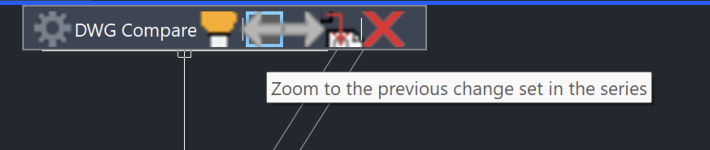
- Highlight added objects
- Find removed geometry
- Review modified entities
- Simplify revision control workflows
Perfect for design reviews, client approvals, and project coordination.
Work Across Multiple Monitors
Keep reference drawings visible while you work.
Floating Drawing Windows allow you to detach drawings into separate windows, making it easier to compare files, reference details, and manage larger projects.
- Side-by-side drawing review
- Reference drawings while drafting
- Large project coordination
- Multi-monitor workstations
Upgrade Without Rebuilding Your Workspace
Upgrade without rebuilding your workspace.
The new Migration Tool transfers settings, aliases, toolbars, and profiles from previous versions so you can get productive faster.
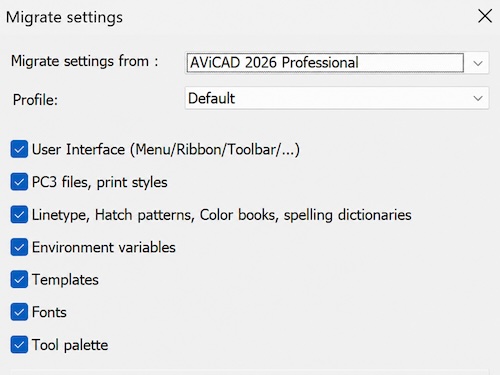
- Profiles
- Toolbars
- Aliases
- Custom settings
- Workspace customizations
Improved PDF & BIM Workflows
Improved PDF & BIM Workflows
Exchange data more easily between CAD, BIM, and PDF-based workflows while reducing the need for third-party conversion tools.
- Improved PDF2CAD conversion
- Create geospatial PDF files
- Revit 2026 RVT and RFA compatibility
- Improved BIM interoperability
Expanded AutoLISP & Visual LISP Support
Build better custom CAD automation tools.
Organizations that rely on custom automation will benefit from significantly expanded LISP compatibility and modern debugging tools.
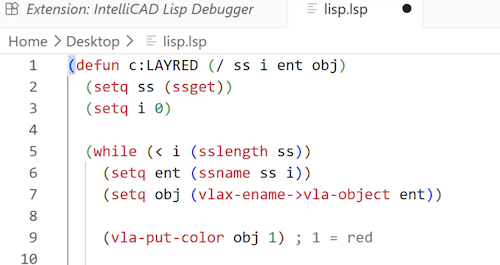
- Visual LISP (VLISP) support
- VLX application support
- FAS application support
- Visual Studio Code debugging integration
- Improved AutoCAD® LISP compatibility
GIS & Mapping Improvements
Work with real-world geographic map data more efficiently.
New GIS tools make it easier to work with survey, infrastructure, utility, and site development projects using real-world geographic data.
- ESRI ArcGIS support integrated into GEOMAP
- Enhanced terrain analysis tools
- Improved TRIANGULATE workflows
- Slope analysis commands
- Elevation labeling tools
- Surveying and civil engineering enhancements
New Commands & Productivity Tools
Complete common drafting tasks with fewer steps.
Several new commands help automate common drafting tasks and improve everyday productivity.
- COMPARE — Compare DWG revisions instantly
- ISODRAFT — Faster 2D isometric drafting
- SVGIMPORT — Import SVG vector graphics
- BARCODE — Create scannable barcode blocks
- SHAREWITH — Share drawings with others
- SURFSCULPT — Convert surfaces into solids
- MREDO — Redo multiple Undo operations
- BTESTBLOCK — Test Dynamic Blocks safely
Enhanced Raster Draw Tools
Edit scanned drawings without leaving AViCAD.
Edit, clean up, and work with scanned drawings and raster images directly inside AViCAD without switching to separate applications.
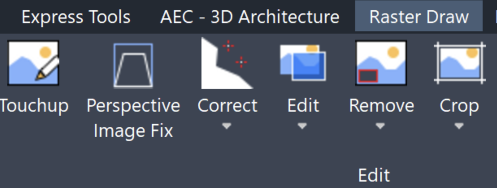
- Perspective correction
- Raster cleanup tools
- Circular crop and erase tools
- Raster object selection tools
- Direct drawing on raster images
Improved Tool Palettes & Dynamic Blocks
Manage reusable content more efficiently.
New enhancements make it easier to organize content, manage reusable components, and work with advanced block workflows.
- Expanded Tool Palette capabilities
- Support for images and external references
- Improved Dynamic Block workflows
- New Dynamic Block testing tools
- Enhanced attribute editing
Plus Hundreds of Refinements Throughout AViCAD
Enjoy a smoother and more productive CAD experience.
AViCAD 2027 includes hundreds of refinements across drafting, annotation, dimensions, tables, multileaders, external references, GIS workflows, rendering, and overall application performance.
AViCAD delivers the familiar AutoCAD®-style workflows you expect, combined with powerful engineering tools, various licensing options, and native DWG compatibility.
Ready to Get Started?
Choose between Monthly, Yearly or Perpetual. All plans include the same features.